



ATS Résumé Format: What Recruiters Actually Look For
Learn about ATS Résumé Format and what recruiters look for to optimize your job application and pass automated screening systems.
Introduction
Your résumé might never reach a human recruiter. Before any hiring manager reviews your qualifications, your application must first pass through an Applicant Tracking System—software designed to filter, rank, and organize candidates automatically. Nearly 98% of Fortune 500 companies use a detectable ATS to screen résumés before a recruiter sees them, making the right format no longer optional but essential.
The challenge is that most job seekers don't know what these systems are actually looking for. You might have impressive credentials, relevant experience, and the perfect skill set, yet still get rejected within seconds because your résumé format confused the software. The ATS doesn't care about creative designs or unique layouts—it cares about structure, keywords, and readability.
Understanding ATS résumé format isn't about gaming the system. It's about ensuring your qualifications are properly communicated in a language both software and recruiters can understand. When you learn what is an ATS-friendly resume, you gain control over how your application is evaluated, dramatically increasing your chances of moving forward in the hiring process.
This guide breaks down exactly what recruiters look for when reviewing ATS-scanned résumés, the common formatting mistakes that trigger automatic rejection, and the practical steps you can take to optimize your application. By the end, you'll know how to craft a résumé that passes automated screening while still impressing the human decision-makers who ultimately control your job prospects.
Problem Statement
Your résumé might never reach a human recruiter. Most large employers and staffing agencies use Applicant Tracking Systems to filter applications automatically, and the majority of résumés fail this initial screen not because candidates lack qualifications, but because their formatting confuses the software. Understanding where résumés break down in ATS processing is the first step toward building one that survives.
Why Most Résumés Fail ATS Screening
Applicant Tracking Systems parse résumés by extracting text and matching it against job requirements. When your résumé uses incompatible formatting, the ATS cannot read your credentials accurately—or at all. The result is immediate rejection, often before a recruiter sees your name. Research shows that a significant majority of résumés are eliminated before human review, with some estimates placing the figure as high as three-quarters of all submissions.
Common Formatting Pitfalls That Trigger ATS Rejection
Certain design choices that look polished to human eyes create parsing errors for ATS software. Graphics, images, and logos embedded in your header prevent the system from extracting your contact information. Tables and text boxes fragment your work history into unreadable chunks. Creative fonts and unusual characters render as gibberish or disappear entirely when the ATS converts your document to plain text.
Headers and footers pose another frequent problem. Many candidates place their name and contact details in a document header, but most ATS platforms ignore content in these regions. When the system cannot locate basic identifiers, it may discard your application as incomplete. Similarly, using columns to organize experience and education creates left-to-right reading errors, causing the ATS to jumble job titles with dates or merge unrelated sections.
The Hidden Cost of Template Overreach
Pre-designed résumé templates often prioritize visual appeal over ATS compatibility. Intricate layouts with sidebars, shaded sections, or unconventional heading structures confuse parsing algorithms. Even subtle choices—like using non-standard section titles such as "Where I've Been" instead of "Work Experience"—prevent the ATS from categorizing your information correctly. The software looks for specific keywords and conventional labels; when it cannot find them, it assumes the data is missing.
Another overlooked issue is file format. Submitting your résumé as a JPEG, PNG, or highly formatted PDF can render it unreadable. While many modern ATS platforms handle standard PDFs, older systems or those configured for strict text extraction may fail to parse anything beyond plain text or basic Word documents. For more context on what makes a résumé ATS-compatible, see What Is an ATS-Friendly Resume? A Definition for Job Seekers.
Solution Steps for Crafting an ATS-Friendly Résumé
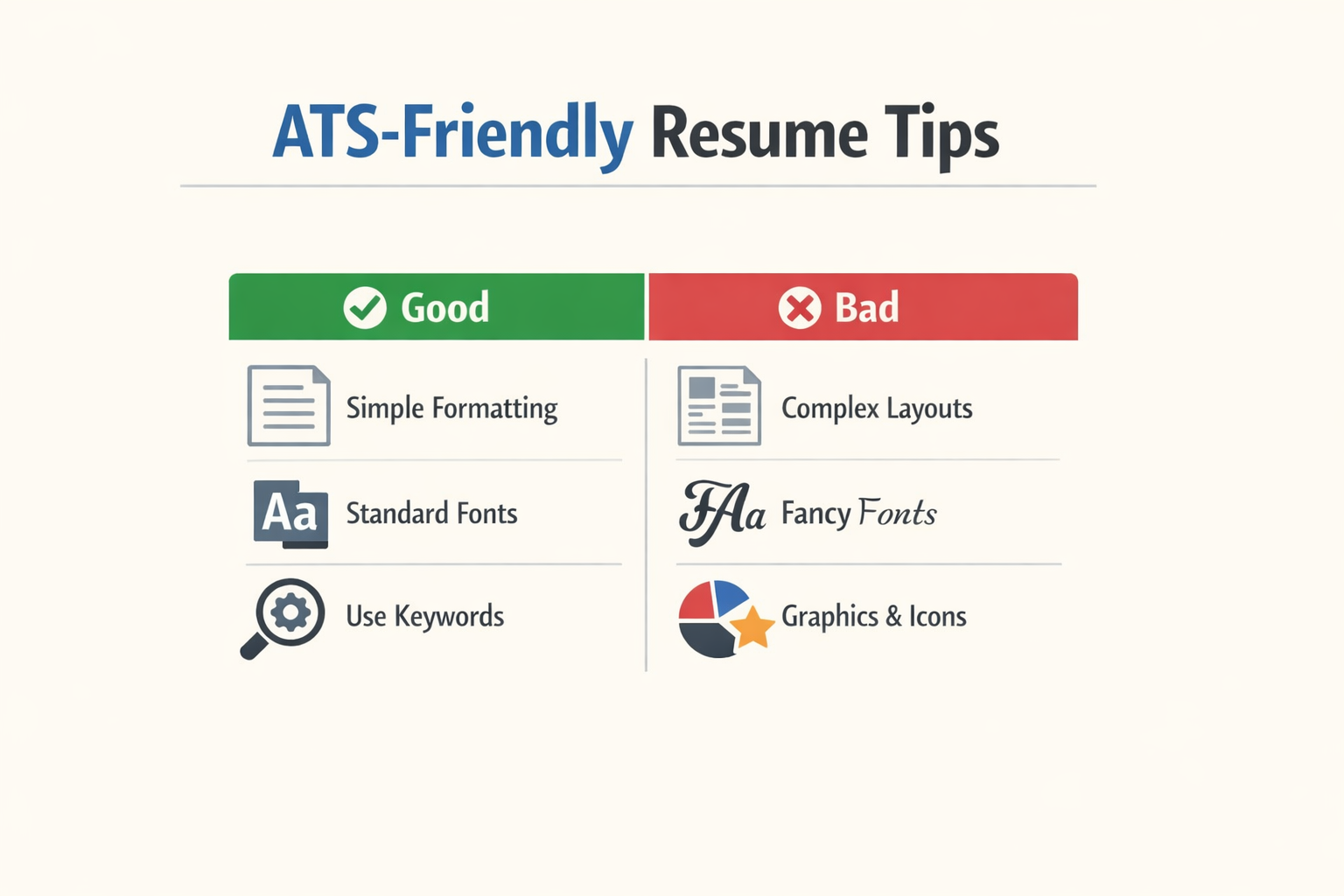
Creating a résumé that successfully navigates automated screening requires deliberate formatting choices and strategic content decisions. The following steps provide a systematic approach to building a document that both machines and human recruiters can process effectively.
Choose ATS-Compatible Formatting Elements
Start with the structural foundation that determines whether your résumé will be parsed correctly. Use simple, clean fonts like Arial or Calibri in a readable size between 10 and 12 points. Avoid decorative typefaces, script fonts, or any text smaller than 10 points, as these create recognition errors in automated systems.
Step 1
Select a clean, single-column layout
Structure your résumé with a single-column design that flows from top to bottom. Avoid multi-column layouts, text boxes, headers, footers, and tables—these elements confuse parsing algorithms and cause your information to be extracted incorrectly or lost entirely.
Step 2
Use standard section headings
Label your sections with conventional headers that ATS software recognizes: "Work Experience," "Education," "Skills," and "Certifications." Creative alternatives like "My Journey" or "Where I've Been" prevent the system from categorizing your information correctly, which can result in your résumé being filtered out even when you're qualified.
Optimize Content for Keyword Matching
Once your structure is ATS-safe, focus on the language that will trigger positive matches during automated screening. Read the job description carefully and identify the exact terminology used for required skills, qualifications, and responsibilities.
Step 3
Mirror job description language
Incorporate the precise phrases from the posting into your résumé wherever truthful and relevant. If the job requires "project management," use that exact term rather than synonyms like "project coordination" or "initiative leadership." This direct matching significantly improves your keyword score.
Strengthen Your Content with Quantifiable Achievements
Numbers and metrics serve dual purposes in an ATS résumé: they provide structured data points that systems can extract and score, while also giving human reviewers concrete evidence of your impact.
Step 4
Quantify your accomplishments
Replace vague descriptions with specific metrics wherever possible. Instead of "improved team efficiency," write "increased team output by 23% over six months." Include percentages, dollar amounts, timeframes, team sizes, and other measurable outcomes that demonstrate the scope and scale of your contributions.
For deeper guidance on what makes a résumé truly ATS-compatible, explore our comprehensive breakdown in What Is an ATS-Friendly Resume? A Definition for Job Seekers.
Eliminate Non-Readable Elements
The final step involves removing anything that automated systems cannot process. Graphics, logos, photos, charts, and images are invisible to most ATS platforms. When these elements occupy space where text should appear, the system may skip entire sections or misalign your information.
Save your final document with a clear, professional filename that includes your name, such as "FirstName-LastName-Resume.docx." Avoid special characters, dates, or version numbers in the filename, as some older systems have difficulty processing them.
Tips and Tricks for Optimizing Your ATS Résumé Format

Once you've built the foundation of an ATS-friendly résumé, fine-tuning the details can make the difference between passing automated filters and landing in the rejection pile. These expert tips address the nuances that separate good résumés from great ones in the eyes of both software and human reviewers.
Choose the Right File Format and Layout
The safest format for ATS is a single-column, reverse-chronological résumé saved as .docx. Multi-column layouts, tables, and text boxes confuse many parsing engines, causing them to scramble your content or skip sections entirely. Stick to a straightforward top-to-bottom flow that mirrors how recruiters naturally scan a page.
Select Parser-Safe Fonts
Use clean, widely supported fonts like Arial, Calibri, Helvetica, Georgia, Garamond, or Times New Roman at 10-12pt body size. Decorative or uncommon fonts may render incorrectly in ATS software, leading to garbled text or missing information. Consistency in font choice across your entire document also signals professionalism to human reviewers.
Prioritize Keyword Placement in Work Experience
Not all keyword placements carry equal weight. A keyword inside a work experience bullet ranks higher than the same word sitting in a skills list. This is because ATS algorithms prioritize context—they're designed to reward demonstrated experience over simple declarations. When you describe accomplishments that naturally incorporate target keywords, you satisfy both the software's scoring logic and the recruiter's need for proof.
A keyword inside a work experience bullet ranks higher than the same word sitting in a skills list.
Weave job description language into your bullet points by framing responsibilities and achievements around the exact terms employers use. If a posting asks for "stakeholder engagement," don't write "worked with partners"—use the precise phrase in a sentence that shows impact.
Test Your Résumé Before Submitting
Before you apply, run your résumé through a free ATS checker or paste it into a plain-text editor to see how parsing software interprets it. Look for scrambled dates, missing headings, or misplaced contact information. These quick tests reveal formatting issues that are invisible in your polished PDF but catastrophic in an ATS environment.
For additional guidance on building résumés that pass automated screening, explore our article on What Is an ATS-Friendly Resume? A Definition for Job Seekers.
Avoid Graphics, Headers, and Footers
Logos, headshots, charts, and decorative elements are invisible to most ATS platforms. Worse, they can cause parsing errors that corrupt adjacent text. Similarly, information placed in headers or footers—like your name or contact details—often gets ignored entirely. Keep all critical content in the main body of the document.
Update for Each Application
Tailor your résumé for every job by adjusting keywords, reordering bullet points, and emphasizing the most relevant experiences. A generic résumé rarely scores high enough to surface in recruiter searches. Small, targeted edits signal that you've read the posting carefully and understand what the role demands.
Conclusion
Mastering the ATS résumé format is no longer optional in today's competitive job market. With 75% of resumes eliminated before human review, understanding what recruiters and their automated systems actually look for can mean the difference between landing an interview and disappearing into a digital void. The key takeaways are straightforward: use clean formatting with standard fonts, incorporate relevant keywords naturally from the job description, choose simple section headings, and save your document in a compatible file format.
While more than 90% of executives admit their ATS screens out qualified candidates, you now have the tools to ensure your résumé doesn't become part of that statistic. Focus on clarity over creativity, substance over style, and alignment between your qualifications and the role's requirements. Every section of your résumé should serve a clear purpose and communicate your value in language both systems and humans can understand.
The investment you make in optimizing your ATS résumé format pays dividends throughout your job search. A well-structured, keyword-optimized résumé doesn't just pass automated screening—it creates a stronger first impression when a recruiter finally reviews it. For a deeper understanding of ATS-friendly principles, explore our guide on what is an ATS-friendly resume to build on the foundation you've established here.
Take action today: review your current résumé against the guidelines in this article, make the necessary adjustments, and approach your next application with confidence. Your qualifications deserve to be seen—make sure your format lets them shine through.
Related reading
Honest Resume Score: Why I'd Prefer a 35% Score Over a 92%
Software Engineer Resume: What Gets Past the Screen
Data Scientist Resume: Projects, Stack and Measurable Impact
Related reading
Electrician Resume: Licenses, Hours and Skills That Matter
Truck Driver Resume: CDL Class, Endorsements and Miles
Written by
Resume Coach Team
Published September 8, 2026 · 9 min read
Want this kind of read on your résumé?
We'll tell you what's actually working, what's holding you back, and what to fix — in plain English.
Get My Job Match ScoreYou Might Also Like
More articles to help you advance your career

Why No Interviews? Interview Callback Issues: The Real Reason You're
Discover the real reasons behind interview callback issues and actionable steps to improve your chances of landing job opportunities. Learn why no interviews are

Job Search Truth: 7 Resume Industry Secrets Job Seekers Need to Know
Discover the job search truth and 7 resume industry secrets that can transform your job search. Learn the tough truths about crafting applications that actually work.
ATS Myths: Surprising Practical Misconceptions Debunked
Discover the truth about ATS myths and learn how applicant tracking systems really work with our practical guide to common misconceptions and realities.

Job Application Silence: Surprising Expert Insights and Solutions
Experiencing job application silence after applying? Discover surprising expert insights on why it happens and practical solutions to overcome it.